
Since release, we've added a lot to the Hunt Showdown cheat, including more features and quality of life changes to improve the cheat. Here's what's new, plus a detailed look at the rest of the cheat if you haven't tried it yet.
2D Radar
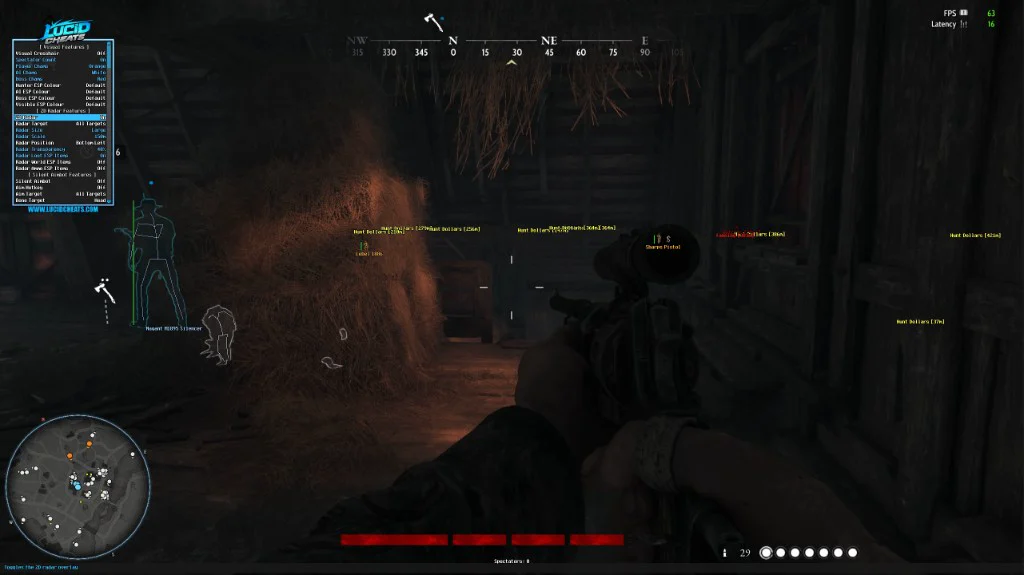
The 2D radar now renders the map that you're playing on, giving you a much better idea of where enemy hunters, AI, or loot items are.
You can choose to show Hunters only, AI/Bosses only, as well as choose to show enabled Loot, World, and Ammo ESP items that you have enabled in the menu.
2D Radar Features
| Option | Settings | Description |
|---|---|---|
| 2D Radar | Off, On | Toggles the 2D radar overlay |
| Radar Target | All Targets, Players Only, AI/Bosses Only | Choose which entity categories the radar shows (players, AI/Bosses, or all) |
| Radar Size | Small, Medium, Large, Extra Large | Adjusts the pixel size of the radar overlay |
| Radar Scale | 75m, 100m, 150m, 200m, 250m, 300m, 400m, 500m | Adjusts the radar zoom level |
| Radar Position | Bottom Left, Bottom Right, Top Right, Top Left | Select which corner of the screen the 2D radar overlay draws |
| Radar Transparency | Off, 10%, 20%, 30%, 40%, 50%, 60%, 70%, 80%, 90% | Adjust the transparency of the radar map overlay |
| Radar Loot ESP Items | Off, On | Draws enabled loot ESP items on the radar |
| Radar World ESP Items | Off, On | Draws enabled world ESP items on the radar |
| Radar Ammo ESP Items | Off, On | Draws enabled ammo ESP items on the radar |
Spectator Count
Shows how many players are spectating you, so you know when to be extra careful about how you play with the cheat.
Battle Mode
Battle mode toggles off item, world, and other ESP so it doesn't get in the way of hunters and AI during a fight. An overlay message will display at the top center of the screen indicating that Battle Mode has been enabled, showing the hotkey you configured to disable it.
Set it to Players Only (hunters stay on) or All Targets (hunters/AI/Bosses stay on), pick a hotkey, and tap it to toggle.
Silent Aimbot
Unlike traditional aimbot, which snaps your view to the target, silent aimbot redirects your fired bullets to the target, at the bone you have selected. Making it much harder to detect, while guaranteeing your shots land where you want them to land.
Since release we've added Aim Hit Chance, a Dynamic FOV Limit, and two extra bone options: Random and Nearest Crosshair.
Random Bone - picks a different bone at random each shot.
Bone Nearest Crosshair - selects whichever bone is closest to your crosshair when firing.
Aim Hit Chance - controls the percentage of fired bullets that Silent Aimbot redirects, from 10% to 100%. Bullets that do not pass the hit-chance roll follow their normal trajectory.
Dynamic FOV Limit - automatically scales the selected FOV size based on target distance, using a wider FOV for nearby targets and a tighter FOV at longer range. The Normal setting keeps the FOV at a fixed size.
Silent Aimbot Features
| Option | Settings | Description |
|---|---|---|
| Silent Aimbot | Off, On | Toggle to redirect fired bullets to visible entities nearest to your crosshair |
| Aim Hotkey | Off, CTRL, ALT, Middle Mouse Button, Side Mouse Button 1, Side Mouse Button 2 | Assigns a hotkey to activate silent aim while firing |
| Aim Target | All Targets, Players Only, AI/Bosses Only | Choose to silent aim at hunters, AI/Bosses, or all targets |
| Bone Target | Head, Neck, Chest, Pelvis, Random Bone, Bone Nearest Crosshair | Select which bone the silent aimbot hits on entities |
| Hit Chance | 100%, 90%, 80%, 70%, 60%, 50%, 40%, 30%, 20%, 10% | Sets the percentage chance that silent aim will redirect a fired bullet |
| Aim FOV Limit | Off, Normal, Dynamic | FOV mode: Off, Normal (fixed), Dynamic (scales by distance) |
| FOV Size | 100px, 75px, 50px, 25px, 20px, 15px, 10px | Size of the silent aim FOV cone |
| FOV Circle Colour | Red, Blue, Green, Yellow, Orange, Purple, Pink, White, Cyan, Magenta, Gold, Maroon | Colour of the FOV circle drawn on screen |
| Hide FOV Circle | Off, On | Hide the FOV circle so it's not drawn on screen |
| Aim Distance Limit | Off, 1100m, 1000m, 900m, 800m, 700m, 600m, 500m, 400m, 300m, 200m, 100m, 50m, 25m | Sets a maximum range for bullet redirection in meters |
ESP Colours
You could already customise Chams separately for Hunters, AI, and Bosses, as well as individual Loot, World, and Ammo ESP items. We have now extended that customisation to Hunter, AI, and Boss ESP. Use your own colours or keep the defaults. (These colours settings extend to the 2D Radar)
There is also a separate Visible ESP Colour, which is red by default. When a Hunter, AI, or Boss enters your line of sight, its ESP changes to this colour. Targets behind cover keep their category colour, making visible targets easy to spot.
| Colour | Default | Options |
|---|---|---|
| Hunter ESP | Orange | Default, Red, Blue, Green, Yellow, Purple, Pink, White, Cyan, Magenta, Gold, Maroon |
| AI ESP | White | Default, Red, Blue, Green, Yellow, Orange, Purple, Pink, Cyan, Magenta, Gold, Maroon |
| Boss ESP | Maroon | Default, Red, Blue, Green, Yellow, Orange, Purple, Pink, White, Cyan, Magenta, Gold |
| Visible ESP | Red | Default, Blue, Green, Yellow, Orange, Purple, Pink, White, Cyan, Magenta, Gold, Maroon |
Menu Configuration
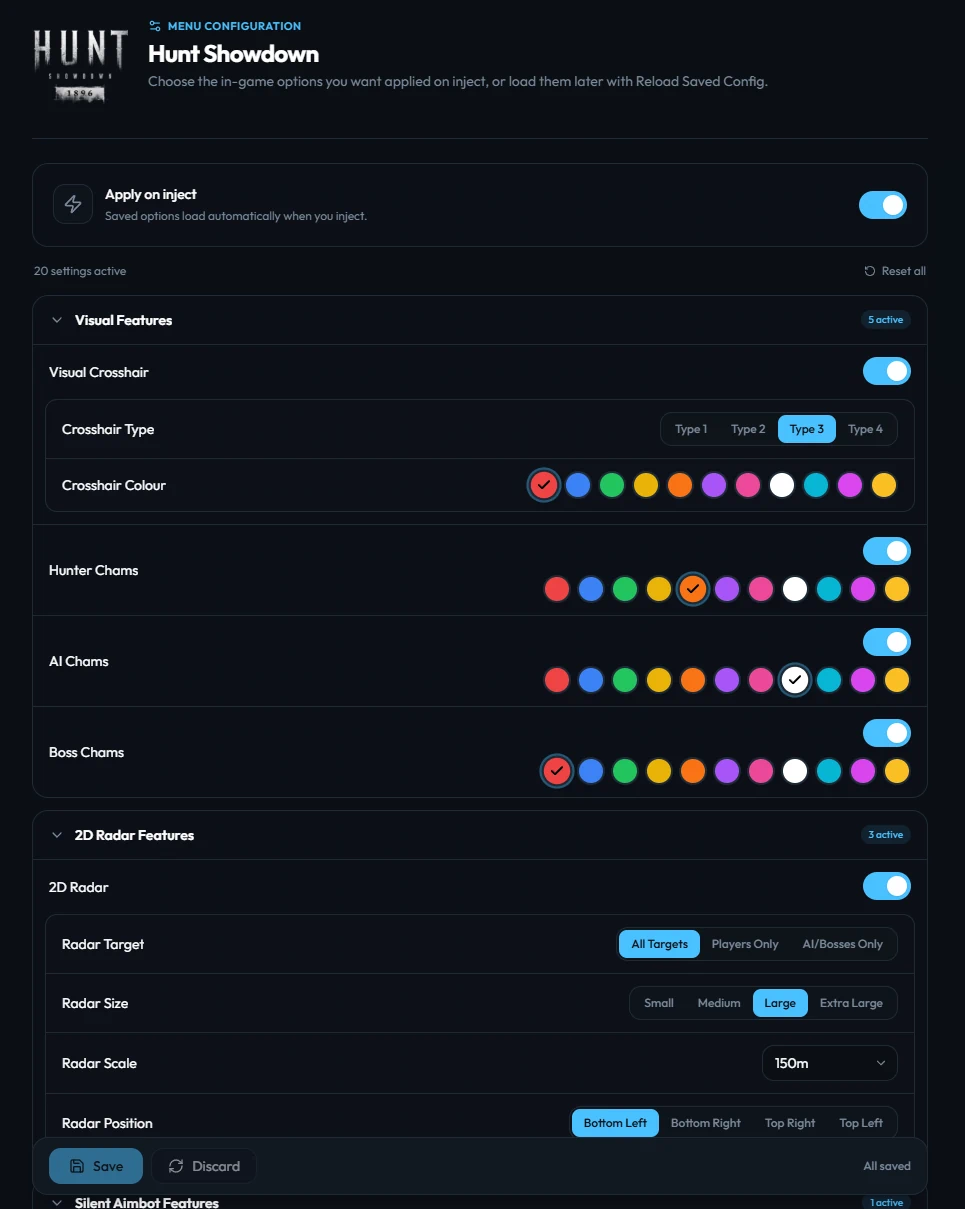
As with every feature we add, the new options are also available in the dashboard menu config. Set everything up once, save your configuration in the dashboard, and your settings will be configured in the cheat automatically each time you inject.
More Features
The radar, Spectator Count, Battle Mode, Silent Aimbot, and colour settings are only part of the Hunt Showdown cheat. The rest of the feature set includes:
- Hunter ESP — Names, boxes, skeletons, health, distance, tracer lines, item in hands, teammates, dead and burned-out hunters, visible-only ESP, and a distance limit
- AI ESP — Names, boxes, skeletons, distance, tracer lines, and a distance limit
- Boss ESP — Names, boxes, skeletons, distance, tracer lines, and a distance limit
- Loot ESP — Traits, item boxes, saddle bags, Hunt Dollars, Blood Bonds, blueprints, Hunter XP, Bloodline XP, upgrade points, pledge marks, cash registers, gun oil, tools, and consumables
- World ESP — Extractions, supply points, projectiles, armed traps, active beetles, health packs, lanterns, animals, cargo crates, and primary, secondary, and melee weapons
- Ammo ESP — Standard and special ammo crates, compact, medium, long, and shotgun ammo, plus ammo swap stations
- Visuals & quality of life — Four crosshair styles with custom colours, separate Hunter, AI, and Boss Chams, FPS and clock overlays, a configurable menu key, and left or right menu positioning
Available Now
All of these features are available now and included with every LucidCheats Hunt Showdown cheat subscription.

We value your feedback, and some of these features/changes came directly from member suggestions. If you have an idea, change you would like to see, or just general feedback, submit a ticket through your member dashboard to share it directly with our team.
We're committed to continuing to improve the cheat wherever possible while keeping it updated and undetected.
— The LucidCheats team